
The platform
Everything a route needs, in one app.
CarrierTrack® is our own delivery platform: audible and visual guidance, turn-by-turn directions, real-time tracking and photo verification in one system built for the route. The version running this morning is the one we are still building on.
Audible & visual guidance
Turn by turn, spoken out loud and right on screen.
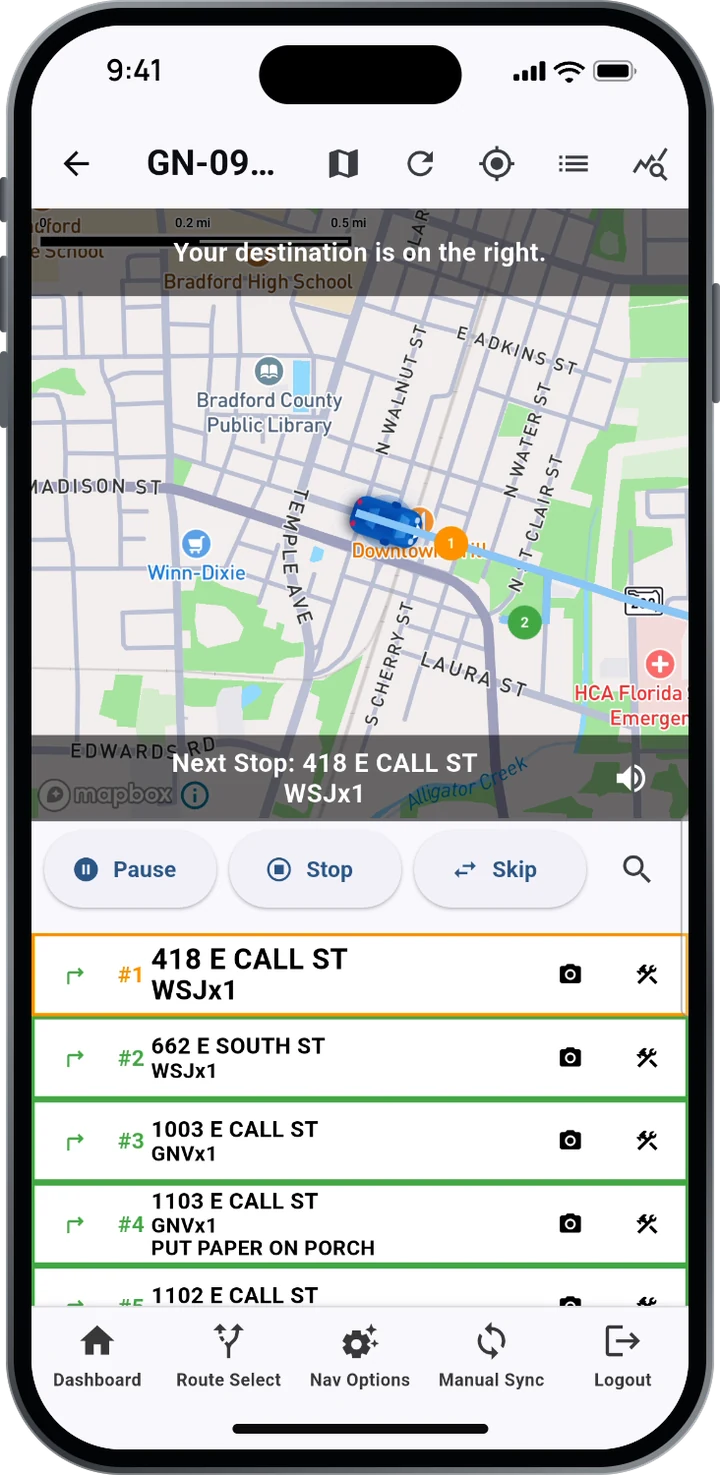
Delivery information is given audibly and visually at every stop, with turn-by-turn directions to the next one, on the phone or on the vehicle’s screen through Apple CarPlay.
- The next stop’s address, product and delivery note, like “Put paper on porch”
- “Your destination is on the right” as the carrier arrives
- Pause, Stop and Skip controls, a stop search, and a mute toggle for the voice
- Works on iOS and Android, and with Apple CarPlay
Real-time verification
Pull up to a stop, and it’s verified by GPS.
Stops complete as the carrier arrives. No tapping, no guesswork, and a record of every delivery the moment it happens.
- “You have arrived” and “Stop completed” prompts keep the carrier moving
- Real-time route tracking for your office while the route runs
- Any address can be checked against the route record
Photo confirmation
Snap a photo. Note where it landed.
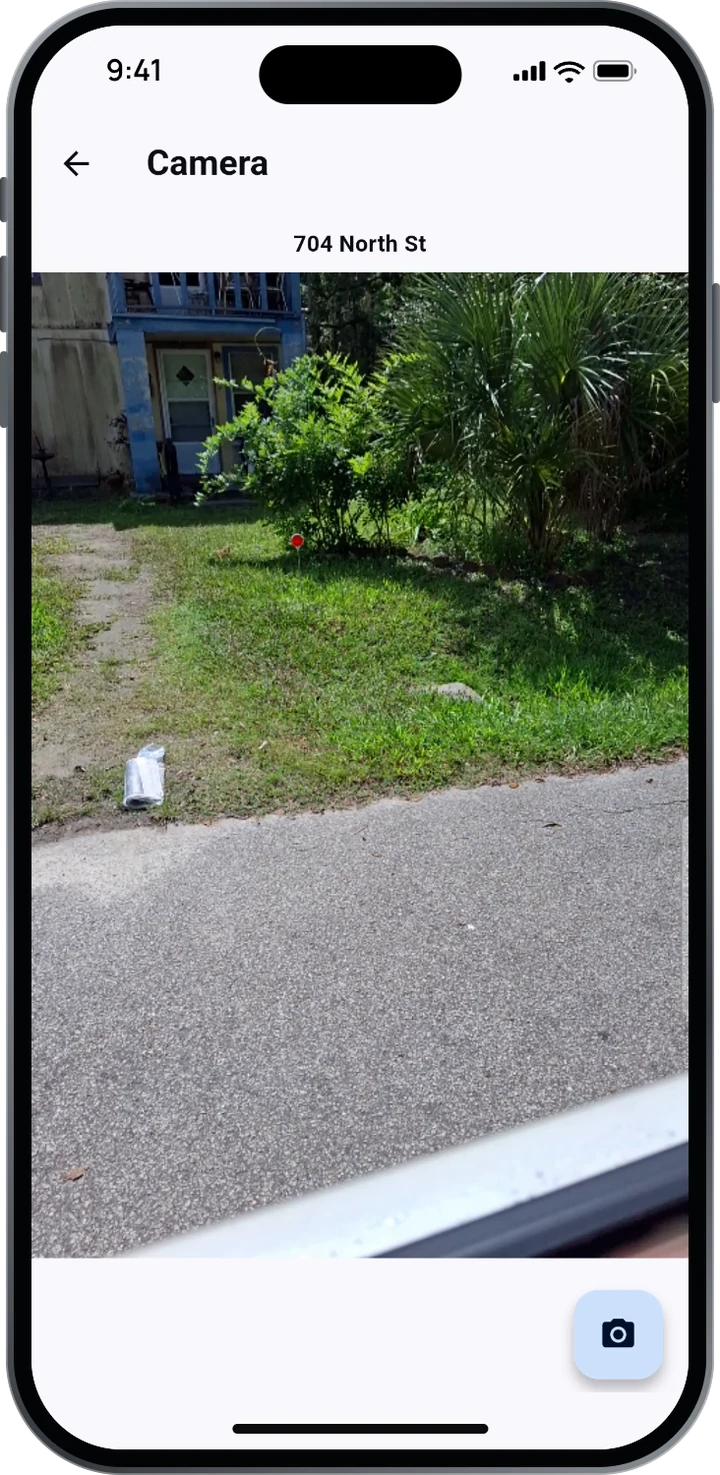
When a stop needs proof, the carrier takes a photo of the delivery and records the placement: porch, driveway or tube. It becomes part of the route record your office and your advertisers can rely on.
Only in CarrierTrack®
CARS: Carrier Arranged Route Sequencing.
CarrierTrack puts route sequencing directly in the driver’s hands. Carriers reorder stops by dragging addresses in the list or arranging them on the map, and the new sequence shows instantly in both views.
- Drag & drop stopsReorder addresses right in the list.
- Arrange on the mapList and map update instantly.
- Save the sequenceFor a single day or future deliveries.
CarrierTrack keeps the carrier’s preferred order and adjusts it around set delivery cycles as volumes and addresses change, giving carriers more control, consistency and efficiency in how their routes are delivered.
Route Select
The right route, every morning.
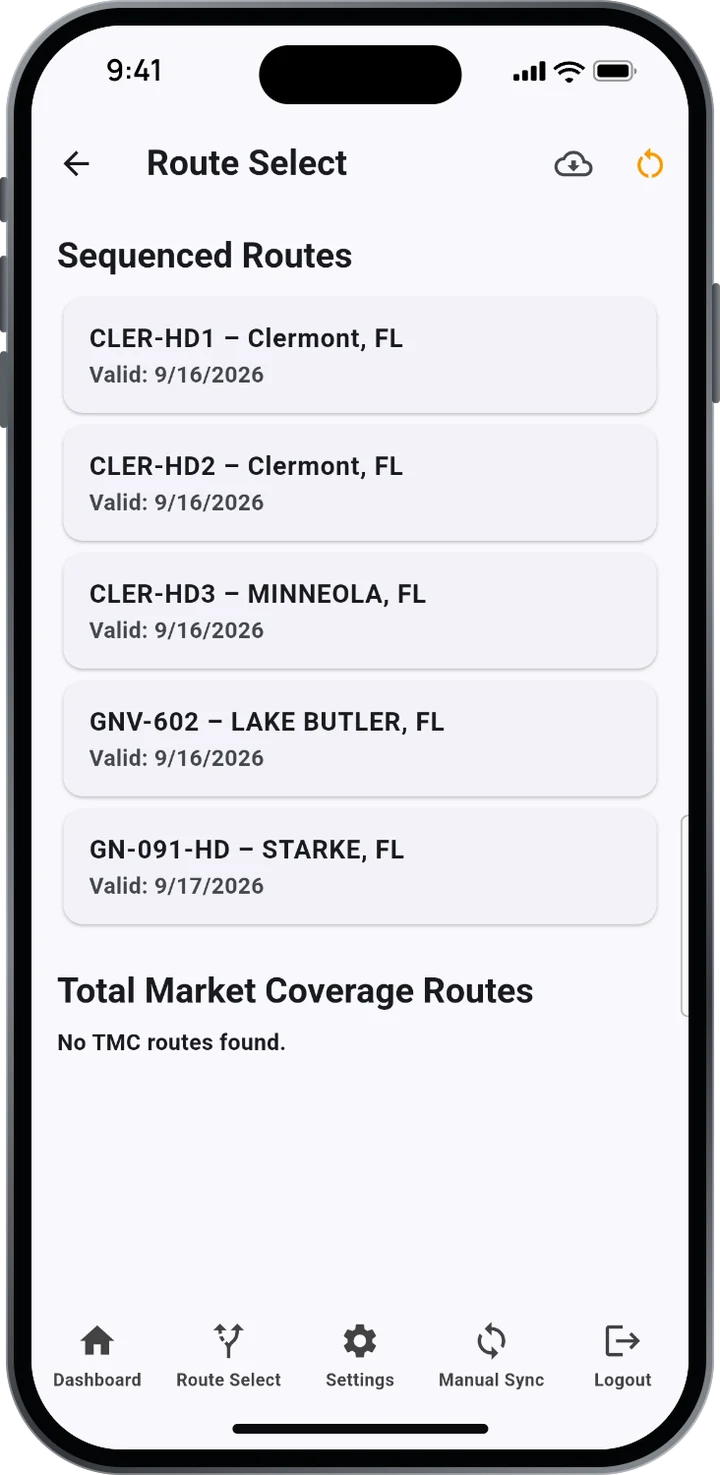
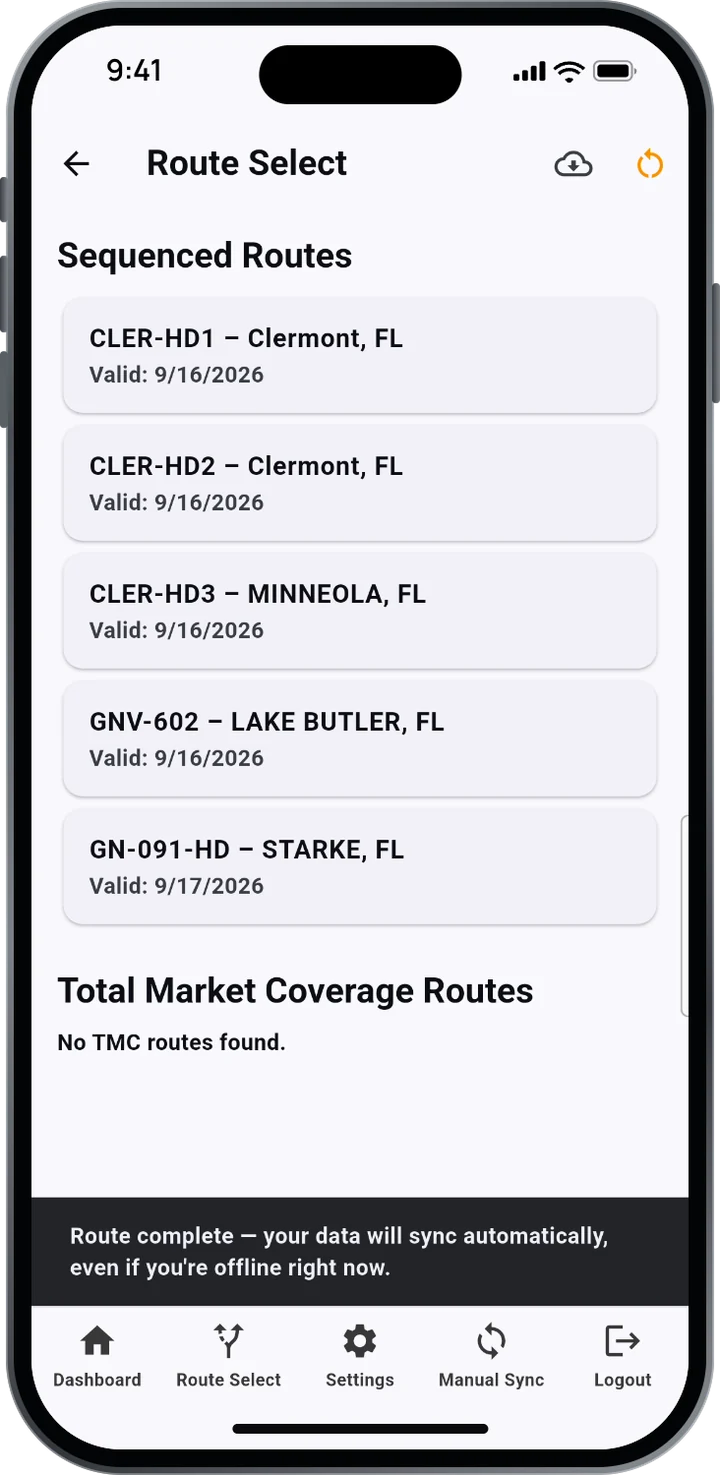
Carriers choose from their sequenced routes, each labelled with its market and the date it’s valid. Total Market Coverage routes are listed separately, so TMC runs never get mixed up with home delivery.
Stop Toolkit
Tools for the stops that aren’t simple.
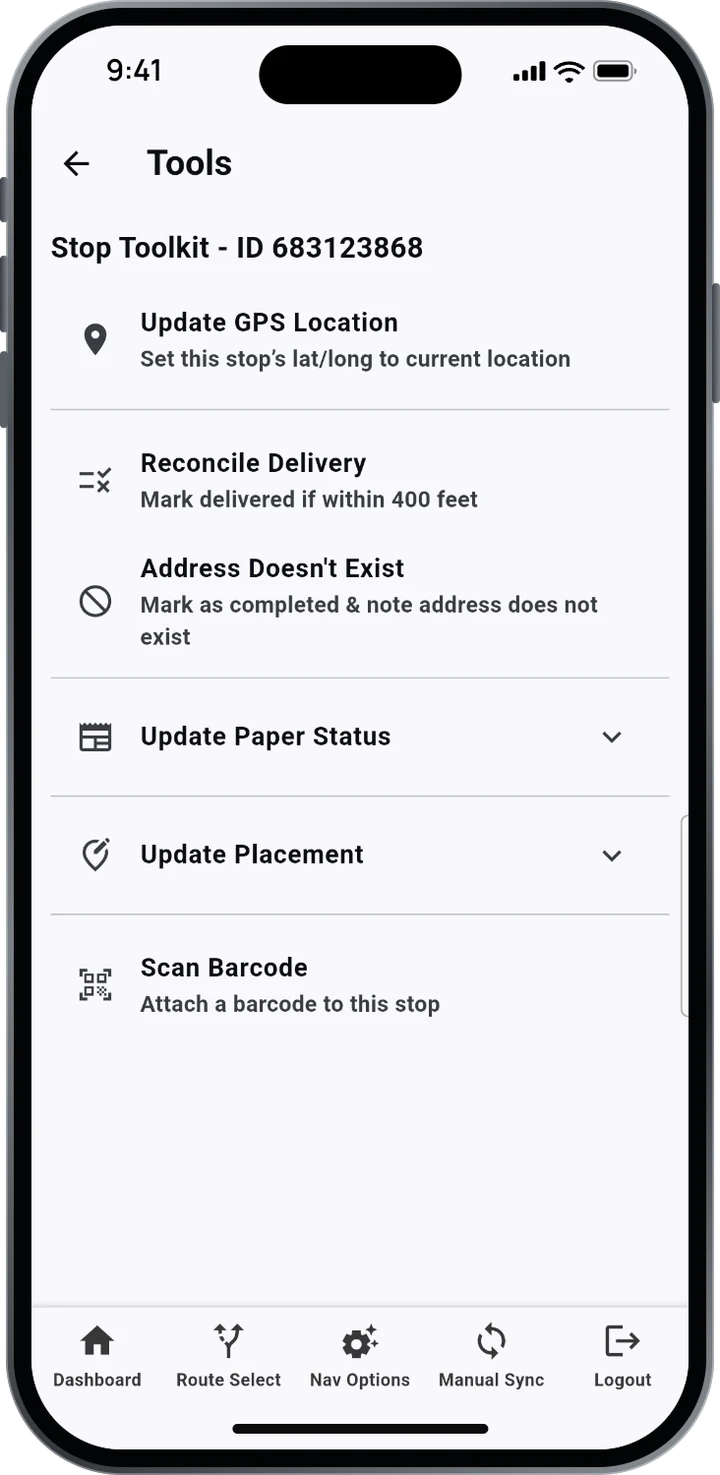
New construction, a moved mailbox, a changed order: carriers fix it at the stop instead of calling it in.
- Update GPS LocationSet the stop to where the carrier is standing
- Reconcile DeliveryMark delivered if within 400 feet
- Address Doesn’t ExistComplete the stop and note it
- Update Paper StatusChange what was delivered
- Update PlacementRecord where it was left
- Scan BarcodeAttach a barcode to the stop
Built for the road
Route complete. Uploaded automatically.
When the last stop is done, CarrierTrack sends the route to your office on its own. No signal at that moment? It sends as soon as the phone is back in coverage. Manual Sync is always one tap away.
Management reporting
Reports for circulation, operations and advertisers.
CarrierTrack generates a wide variety of management reports from the route record, plus live weekly delivery audits that give your clients clear visibility and ongoing assurance that deliveries are being completed.
- Real-time tracking while routes run
- Misses visible the same morning
- Advertiser assurance backed by GPS and photos
- CirculationMisses caught the same morning, checkable by address
- OperationsReal-time route tracking while routes run
- Advertiser assuranceGPS and photo proof you can share
Getting started
From setup to go-live, with one team.
Our team takes every new client from “Setup” to “Go Live”. We build your routes, map your market and train your people.
1. Map and route
Our cartographers map your market and design balanced, efficient routes from your data, combining science and art.
2. Set up and train
We load your routes and products into CarrierTrack and train carriers and staff, with custom training videos if you want them.
3. Go live
Carriers download the app on iOS or Android and start delivering. Your office sees every route from the first morning.
See CarrierTrack on your own routes.
A demo covers the carrier app and the office side, built around your operation.